
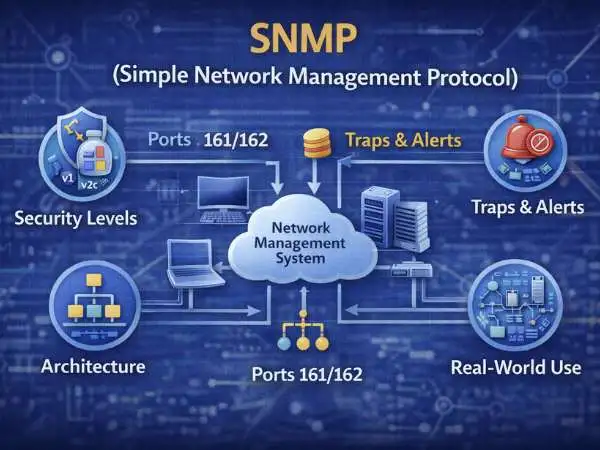
Walk into any enterprise network and you’ll find hundreds of devices quietly doing their jobs. Routers forward traffic. Switches move packets between VLANs. Firewalls inspect connections. Wireless controllers manage access points. Now imagine trying to manually check each one every hour.
That’s impossible.
This is why SNMP (Simple Network Management Protocol) exists.
SNMP simple network management protocol is used for monitoring, managing, and collecting data from network devices at scale. It doesn’t carry user traffic. It doesn’t deliver websites. Instead, it acts like a control tower — observing everything and reporting what matters.
In this deep guide, we’ll explore SNMP from the ground up: what it does, how it works, its architecture, the UDP ports it uses, SNMP traps, versions and security levels, advantages and limitations, and how it fits into modern computer networks.
Also Read : – Voice To Text App For Android
What Is SNMP Simple Network Management Protocol
SNMP stands for Simple Network Management Protocol. It is a standard protocol used in computer networks to monitor and manage devices such as routers, switches, firewalls, printers, and servers.
At its core, SNMP answers a simple question:
“What is happening inside my network devices right now?”
Instead of logging into each router individually, SNMP allows a central system to collect information automatically. That information includes performance metrics, device health indicators, and fault notifications.
SNMP simple network management protocol is used for visibility. And in networking, visibility is everything.
SNMP Simple Network Management Protocol Is Used For
When people search “snmp simple network management protocol is used for,” they’re usually trying to understand its practical role.
SNMP is primarily used for three major purposes:
Monitoring Performance
Network administrators rely on SNMP to monitor:
- CPU utilization
- Memory usage
- Bandwidth consumption
- Interface statistics
- Device uptime
This allows teams to detect bottlenecks before users experience slowdowns.
Fault Detection
If a switch port fails or a router reboots unexpectedly, SNMP can detect that event immediately. Devices can either respond to polling requests or send alerts (called traps) proactively.
Capacity Planning
Over time, SNMP data shows trends. Maybe bandwidth usage is rising month over month. Maybe a core router is running near CPU limits. SNMP provides the historical data needed to plan upgrades intelligently.
In short, SNMP turns raw infrastructure into measurable systems.
Also Read : – Facebook Dark Mode IPhone
Simple Network Management Protocol in Computer Networks With Example
To truly understand simple network management protocol in computer networks with example, let’s walk through a realistic scenario.
Imagine a mid-sized company with:
- 40 branch routers
- 120 access switches
- 15 firewalls
- 80 wireless access points
Without SNMP, the IT team would need to manually log into each device to check its health. That approach does not scale.
With SNMP:
- A central monitoring server queries devices every five minutes.
- Each device responds with updated performance data.
- If a WAN link fails, the router immediately sends a trap.
- The monitoring dashboard highlights the issue.
- The IT team responds within minutes.
This is the difference between reactive firefighting and proactive monitoring.
Also Read : – MNSU D2L Brightspace Login Mnsu.learn.minnstate.edu
Architecture of SNMP
The architecture of SNMP is simple but powerful. It is built on three primary components that work together.
SNMP Manager
The SNMP manager is the central monitoring system. It initiates communication, sends requests, receives responses, and processes collected data.
The manager usually runs as part of a network management system (NMS). It visualizes metrics, generates alerts, and stores historical records.
The manager is the “brain” of SNMP monitoring.
SNMP Agent
The SNMP agent runs on the managed device itself. Most routers and switches include an SNMP agent built into their operating system.
The agent collects local device data and stores it in a structured format. When the manager requests information, the agent retrieves it and sends it back.
Agents are lightweight and designed not to interfere with primary device functions.
Managed Device
The managed device is any hardware that supports SNMP. Examples include:
- Routers
- Switches
- Firewalls
- Load balancers
- Servers
- Printers
Each managed device runs an agent and exposes data to the manager.
Management Information Base (MIB)
SNMP organizes data using a Management Information Base (MIB).
A MIB defines structured objects that represent measurable device parameters. Each object has an Object Identifier (OID). These OIDs form a hierarchical tree.
For example:
- System uptime
- Interface speed
- Error counters
Without MIBs, SNMP would have no standardized data structure.
Also Read : – SMS Marketing & The Many Benefits It Can Offer Your Business
SNMP Simple Network Management Protocol Port
One of the most searched technical questions is about the SNMP simple network management protocol port.
SNMP uses:
- UDP Port 161 for request and response communication
- UDP Port 162 for SNMP traps
These ports are globally standardized.
Why SNMP Uses UDP
SNMP simple network management protocol uses UDP port 161 and 162 instead of TCP. UDP is chosen because it is lightweight and fast.
Monitoring traffic should not overload the network. UDP allows quick transmission of small monitoring packets with minimal overhead.
While UDP does not guarantee delivery, SNMP compensates with repeated polling and alert mechanisms.
Simple Network Management Protocol SNMP Trap
An SNMP trap is a notification sent by a device to the manager without being asked.
Unlike polling, which is initiated by the manager, traps are proactive.
For example:
- A power supply fails.
- A link goes down.
- CPU exceeds threshold.
Instead of waiting for the next polling cycle, the device immediately sends a trap to UDP port 162.
Traps reduce response time and improve operational awareness.
SNMP Security Levels & Versions
SNMP has evolved through three main versions, each improving functionality and security.
SNMPv1
The original version. It uses community strings for authentication but provides no encryption.
It is simple but insecure by modern standards.
SNMPv2c
Improved performance and added bulk data retrieval. However, it still relies on community strings without encryption.
Many legacy networks still use v2c, but it carries risk.
SNMPv3
SNMPv3 introduced serious security improvements:
- Authentication
- Encryption
- Message integrity
SNMPv3 defines three security levels:
- NoAuthNoPriv
- AuthNoPriv
- AuthPriv
AuthPriv provides both authentication and encryption, making it the most secure configuration.
In modern enterprise networks, SNMPv3 is the recommended standard.
Advantages & Limitations of SNMP
Like any protocol, SNMP has strengths and weaknesses.
Advantages
SNMP is widely supported across vendors. Almost every network device includes built-in SNMP capability. It is lightweight and scalable, capable of monitoring thousands of devices from a single platform.
It is also standardized, which ensures interoperability across manufacturers.
Limitations
Older versions lack strong security. SNMP relies on UDP, meaning packet delivery is not guaranteed. It is primarily designed for monitoring, not full configuration management.
Complex MIB structures can also create a learning curve for beginners.
Despite these limitations, SNMP remains foundational in network monitoring.
SNMP in Modern Network Environments
Even as cloud computing and software-defined networking grow, SNMP continues to play a central role.
In hybrid networks, SNMP monitors on-premise hardware. In data centers, it tracks hardware health. In ISPs, it monitors backbone routers.
New monitoring tools may add advanced analytics, but they still rely heavily on SNMP underneath.
SNMP persists because it solves a core problem efficiently: structured, standardized device monitoring.
Also Read : – How you can fix no Provider Was Discovered Pancakeswap issue
Final Thoughts on SNMP Simple Network Management Protocol
SNMP simple network management protocol is not glamorous. It does not deliver content. It does not encrypt your web traffic. Yet without it, large-scale network management would collapse into chaos.
Its architecture is clean. Its operation is efficient. Its security evolved over time. And its relevance remains strong in modern infrastructure.
If you understand SNMP, you understand how networks stay visible, measurable, and controllable at scale.
FAQs
What is SNMP simple network management protocol used for
Monitoring and managing network devices in computer networks.
What port does SNMP use
UDP 161 for queries and UDP 162 for traps.
What is an SNMP trap
A notification sent from device to manager without polling.
Which SNMP version is secure
SNMPv3 with authentication and encryption.
Is SNMP still relevant today
Yes. It remains widely used in enterprise and ISP networks.
